Keeping your IT infrastructure running smoothly isn’t magic—it’s monitoring. A powerful system monitor gives you real-time insights, prevents downtime, and boosts efficiency across servers, networks, and applications.
What Is a System Monitor and Why It Matters

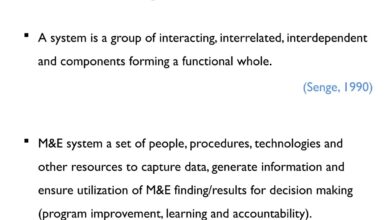
A system monitor is a software tool or suite designed to track the performance, availability, and health of computer systems, networks, and applications. Whether you’re managing a single server or a sprawling cloud environment, a reliable system monitor acts as your digital watchdog, alerting you to problems before they escalate.




Core Functions of a System Monitor
At its heart, a system monitor performs continuous observation of key performance indicators (KPIs) such as CPU usage, memory consumption, disk I/O, network bandwidth, and process activity. These metrics help administrators understand how resources are being used and whether systems are operating within acceptable parameters.
- Real-time tracking of CPU, RAM, and disk usage
- Monitoring active processes and services
- Detecting unusual spikes or bottlenecks
For example, if a background process suddenly consumes 95% of CPU, a system monitor can trigger an alert, allowing swift intervention before service degradation occurs.
Types of System Monitoring
System monitoring isn’t a one-size-fits-all solution. It comes in various forms depending on the infrastructure and goals:
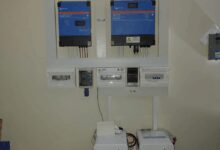
- Hardware Monitoring: Tracks physical components like temperature, fan speed, and power supply health.
- Software Monitoring: Observes application performance, service uptime, and error logs.
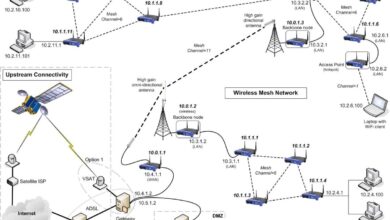
- Network Monitoring: Analyzes bandwidth usage, latency, packet loss, and connectivity status.
Modern system monitor tools often integrate all three, providing a unified view of the entire IT ecosystem. Tools like Nagios and Zabbix exemplify this comprehensive approach.
“Without monitoring, you’re flying blind. You won’t know when something breaks until users start complaining.” — DevOps Engineer, Fortune 500 Tech Firm
Top 7 System Monitor Tools in 2024
Choosing the right system monitor can make or break your IT operations. Below is a curated list of the top seven tools dominating the market in 2024, each offering unique strengths for different environments.
1. Nagios XI – The Veteran Powerhouse
Nagios XI remains one of the most trusted names in system monitoring. Known for its robustness and flexibility, it supports thousands of plugins and integrates seamlessly with existing infrastructure.
- Extensive plugin library for custom monitoring
- Advanced alerting and notification system
- Supports both on-premise and hybrid deployments
While its interface may feel dated compared to newer tools, Nagios XI’s reliability and open-source roots (based on Nagios Core) make it a favorite among enterprise IT teams. Learn more at nagios.com.
2. Zabbix – Open Source with Enterprise Muscle
Zabbix stands out for combining open-source freedom with enterprise-grade features. It offers real-time monitoring of networks, servers, virtual machines, and cloud services—all from a centralized dashboard.
- Auto-discovery of network devices
- Powerful templating engine for rapid deployment
- Scalable from small setups to large data centers
Zabbix uses a server-agent model and supports agentless monitoring via SNMP, IPMI, and JMX. Its active community and regular updates ensure it stays competitive. Visit zabbix.com for downloads and documentation.
3. Datadog – Cloud-Native Champion
Datadog is built for the cloud era. As a SaaS-based system monitor, it excels in monitoring dynamic environments like AWS, Azure, and Kubernetes clusters.
- Real-time dashboards with drag-and-drop customization
- AI-powered anomaly detection
- Integrated log management and APM (Application Performance Monitoring)
Datadog’s strength lies in its ecosystem. It integrates with over 600 technologies, making it ideal for DevOps teams practicing CI/CD. Pricing is usage-based, which can be costly at scale, but the ROI in visibility and troubleshooting speed is significant. Explore it at datadoghq.com.
4. Prometheus – The DevOps Favorite
Prometheus has become the go-to system monitor for containerized and microservices architectures. Originally developed at SoundCloud, it’s now a CNCF (Cloud Native Computing Foundation) graduate project.
- Pull-based monitoring model using HTTP
- Powerful query language (PromQL)
- Excellent integration with Grafana for visualization
Prometheus collects metrics at defined intervals and stores them in a time-series database. While it lacks built-in alerting (handled by Alertmanager), its scalability and flexibility make it a staple in Kubernetes environments. Check it out at prometheus.io.
5. SolarWinds Server & Application Monitor (SAM)
SolarWinds SAM is a commercial solution designed for deep visibility into both hardware and software performance. It’s particularly strong in monitoring complex applications like Microsoft SQL Server, Oracle, and SAP.
- Pre-built templates for 1,200+ applications
- Automated root cause analysis
- User-friendly web interface
SAM integrates with other SolarWinds products, creating a cohesive IT operations suite. However, past security concerns (e.g., the 2020 SUNBURST breach) have made some organizations cautious. Still, for on-premise enterprise monitoring, it remains a solid contender. Learn more at solarwinds.com.
6. PRTG Network Monitor – All-in-One Simplicity
Paessler’s PRTG is known for its ease of use and comprehensive sensor-based monitoring. Each “sensor” monitors a specific metric (e.g., ping response, bandwidth, CPU load), and users can deploy thousands per server.
- Auto-discovery of network devices
- Intuitive web interface with real-time maps
- Supports SNMP, NetFlow, WMI, and more
PRTG is available in both free (100 sensors) and paid versions, making it accessible for small to mid-sized businesses. It runs on Windows and is ideal for hybrid environments. Visit paessler.com for a free trial.
7. New Relic – Full-Stack Observability
New Relic offers a modern, full-stack system monitor platform that combines infrastructure monitoring, APM, browser monitoring, and serverless observability.
- Real-time performance analytics
- AI-driven insights and forecasting
- Free tier with generous limits (100 GB/month)
New Relic’s strength is in its ability to correlate infrastructure metrics with user experience data. For example, it can show how a spike in database latency affects page load times for end users. This makes it invaluable for customer-centric organizations. Explore it at newrelic.com.
Key Features to Look for in a System Monitor
Not all system monitor tools are created equal. To choose the right one, you need to evaluate them based on several critical features that determine effectiveness, scalability, and ease of use.
Real-Time Monitoring and Alerts
The primary value of a system monitor is its ability to provide up-to-the-second data on system health. Real-time dashboards allow administrators to spot issues instantly, while automated alerts (via email, SMS, Slack, etc.) ensure timely response.
- Low-latency data collection (sub-second updates in critical systems)
- Customizable alert thresholds (e.g., CPU > 90% for 5 minutes)
- Escalation policies for unresolved alerts
For instance, a sudden drop in network throughput could indicate a failing switch. A good system monitor will not only detect this but also notify the right team immediately.
Scalability and Performance
As your infrastructure grows, your monitoring solution must scale with it. A system monitor that works for 10 servers may choke when managing 1,000 VMs or containers.
- Distributed architecture for load balancing
- Efficient data storage and retrieval
- Support for cloud auto-scaling groups
Prometheus, for example, uses sharding and federation to handle large-scale deployments, while Datadog automatically scales with your cloud footprint.
Integration and Extensibility
No system monitor operates in isolation. It must integrate with your existing tools—ticketing systems (like Jira), communication platforms (like Slack), and CI/CD pipelines (like Jenkins).
- REST APIs for custom integrations
- Pre-built connectors for popular services
- Plugin or module support for extending functionality
Zabbix and Nagios shine here, offering thousands of community-developed plugins. Meanwhile, New Relic and Datadog provide extensive marketplace integrations.
How System Monitor Enhances IT Operations
Deploying a system monitor isn’t just about seeing graphs—it’s about transforming how your IT team operates. From proactive maintenance to strategic planning, the benefits are far-reaching.
Proactive Issue Detection
Instead of reacting to outages, a system monitor enables proactive troubleshooting. By analyzing trends and setting predictive thresholds, teams can address issues before they impact users.
- Identify memory leaks before they crash applications
- Detect disk space exhaustion early
- Monitor service dependencies to prevent cascading failures
For example, a gradual increase in database response time might indicate indexing issues. A system monitor can flag this trend, prompting optimization before performance degrades noticeably.
Improved Uptime and Reliability
Downtime costs money—often thousands per minute in enterprise environments. A robust system monitor helps maintain high availability by ensuring rapid detection and resolution of problems.
- Automated failover testing
- Uptime tracking and SLA reporting
- Root cause analysis post-incident
With tools like PRTG or SolarWinds, IT teams can generate detailed uptime reports for stakeholders, demonstrating compliance with service level agreements (SLAs).
Optimized Resource Utilization
Many organizations over-provision resources “just in case,” leading to wasted spending. A system monitor provides the data needed to right-size infrastructure.
- Identify underutilized servers for consolidation
- Right-size cloud instances based on actual usage
- Plan capacity upgrades with historical trend analysis
For instance, if monitoring shows that a VM consistently uses only 20% of its CPU, it can be downsized to a smaller, cheaper instance, saving costs without sacrificing performance.
Implementing a System Monitor: Best Practices
Deploying a system monitor is more than just installing software—it requires planning, configuration, and ongoing management to deliver maximum value.
Define Monitoring Objectives
Before installation, clarify what you want to achieve. Are you focused on uptime? Performance optimization? Security? Your goals will shape your monitoring strategy.
- Identify critical systems and services
- Set KPIs (e.g., 99.99% uptime, sub-100ms response time)
- Establish baseline performance metrics
For example, an e-commerce platform might prioritize monitoring checkout process latency, while a SaaS company focuses on API response times.
Start Small, Scale Gradually
Begin with a pilot deployment on non-critical systems. This allows you to test configurations, fine-tune alerts, and train staff without risking production stability.
- Monitor a single server or application first
- Validate alert accuracy and reduce false positives
- Document procedures and create runbooks
Once the pilot succeeds, expand monitoring to more systems, using templates and automation to speed up deployment.
Secure Your Monitoring Infrastructure
Your system monitor holds sensitive data about your infrastructure. If compromised, it could become a gateway for attackers.
- Use strong authentication (MFA, RBAC)
- Encrypt data in transit and at rest
- Regularly update and patch monitoring software
For example, in 2020, SolarWinds’ monitoring platform was compromised via a supply chain attack. Since then, security has become a top priority for all monitoring vendors.
Common Challenges in System Monitoring
Even with the best tools, organizations face hurdles in implementing and maintaining effective system monitoring.
Alert Fatigue
Too many alerts—especially false positives—can overwhelm IT teams, leading to ignored warnings and missed critical issues.
- Implement alert deduplication and correlation
- Use severity levels to prioritize responses
- Apply machine learning to filter noise
Datadog and New Relic use AI to group related alerts and suppress duplicates, reducing cognitive load on engineers.
Data Overload
Modern systems generate terabytes of monitoring data daily. Without proper filtering and visualization, finding actionable insights becomes difficult.
- Use dashboards tailored to different roles (e.g., ops vs. management)
- Apply data retention policies (e.g., keep raw data for 7 days, roll up for 1 year)
- Leverage drill-down capabilities for deep analysis
Grafana, often paired with Prometheus, excels at turning complex data into intuitive visualizations.
Tool Sprawl
Organizations often end up with multiple monitoring tools—each for servers, networks, apps, logs—leading to fragmented visibility.
- Consolidate tools where possible
- Use unified platforms like Datadog or New Relic
- Ensure cross-tool data correlation
A unified system monitor reduces complexity and improves incident response times.
Future Trends in System Monitoring
The field of system monitoring is evolving rapidly, driven by advances in AI, cloud computing, and distributed architectures.
AIOps and Predictive Analytics
Artificial Intelligence for IT Operations (AIOps) is transforming reactive monitoring into predictive maintenance. By analyzing historical data, AIOps platforms can forecast failures and recommend actions.
- Predict disk failures based on SMART data trends
- Forecast resource needs using seasonal patterns
- Automate root cause analysis with machine learning
Tools like Moogsoft and BigPanda are leading this space, integrating with existing system monitors to add intelligence.
Observability Beyond Monitoring
While monitoring asks “Is it working?”, observability asks “Why is it working (or not)?” It combines metrics, logs, and traces to provide deep insight into system behavior.
- Three pillars: metrics, logs, traces
- End-to-end visibility in microservices
- Context-rich debugging for complex systems
New Relic and Datadog are shifting from pure monitoring to full observability platforms, enabling developers to troubleshoot issues across distributed systems.
Edge and IoT Monitoring
As computing moves to the edge—smart factories, remote sensors, autonomous vehicles—the need for lightweight, resilient system monitors grows.
- Low-bandwidth, intermittent connectivity support
- Local processing with cloud sync
- Security-hardened agents for unattended devices
Projects like Telegraf (by InfluxData) are designed for edge monitoring, collecting data locally and forwarding it when connectivity allows.
What is a system monitor used for?
A system monitor is used to track the performance, availability, and health of IT systems, including servers, networks, and applications. It helps detect issues early, ensure uptime, optimize resources, and support troubleshooting through real-time data and alerts.
Which system monitor tool is best for beginners?
PRTG Network Monitor is often recommended for beginners due to its intuitive interface, auto-discovery features, and free version with up to 100 sensors. It requires minimal configuration and provides immediate visibility into network and server performance.
Can a system monitor work in cloud environments?
Yes, modern system monitor tools like Datadog, New Relic, and Prometheus are designed specifically for cloud environments. They support auto-scaling, container monitoring (e.g., Docker, Kubernetes), and integration with cloud providers like AWS, Azure, and Google Cloud.
Is open-source system monitoring reliable?
Yes, open-source system monitors like Zabbix and Nagios are highly reliable and widely used in enterprise environments. They benefit from active communities, frequent updates, and transparency. However, they may require more technical expertise to set up and maintain compared to commercial solutions.
How does a system monitor improve security?
A system monitor improves security by detecting unusual activity—such as unexpected process launches, high network traffic, or failed login attempts—that may indicate a breach. It also ensures critical security services (like firewalls and antivirus) are running and can trigger alerts for immediate response.
In today’s complex IT landscape, a robust system monitor is no longer optional—it’s essential. From preventing downtime to optimizing costs and enhancing security, the right monitoring strategy empowers organizations to operate with confidence. Whether you choose an open-source powerhouse like Zabbix or a cloud-native platform like Datadog, the key is consistency, scalability, and integration. As technology evolves, so too will monitoring, with AI, observability, and edge computing shaping the future. Start monitoring wisely today to build a resilient, responsive, and future-ready IT infrastructure.
Further Reading: