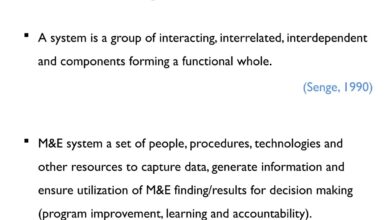
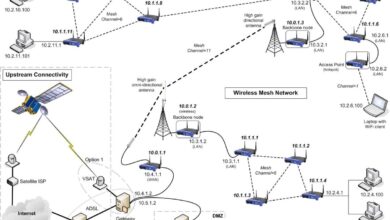
In the world of technology and organizational structures, the term ‘system group’ has evolved into a cornerstone concept. Whether in IT infrastructure, business operations, or cybersecurity, understanding what a system group truly entails can unlock efficiency, security, and scalability. Let’s dive into the powerful world of system groups and uncover what makes them indispensable in modern systems.
What Is a System Group? A Foundational Understanding

The term system group may sound technical, but its implications stretch across industries. At its core, a system group refers to a collection of users, devices, or processes organized under a unified administrative framework to streamline access, permissions, and management within a computing or organizational environment. This concept is pivotal in operating systems, enterprise networks, and cloud platforms.





Defining System Group in Technical Contexts
In computing, a system group is a logical grouping of user accounts or system processes that share common access rights and privileges. For example, in Unix-like operating systems such as Linux, system groups are used to manage file permissions and control access to system resources. The sudo group, for instance, grants administrative privileges to users added to it.
- System groups simplify permission management across multiple users.
- They are essential for role-based access control (RBAC).
- Groups can be local (on a single machine) or domain-wide (in networked environments).
According to the Linux Foundation, proper use of system groups enhances both security and operational efficiency in multi-user environments.
System Group vs. User Group: Key Differences
While the terms are often used interchangeably, there’s a subtle but important distinction. A user group typically refers to any collection of human users, often defined by department or function (e.g., Marketing Team). In contrast, a system group is more technical—often including service accounts, system daemons, or automated processes that require specific permissions.
“System groups are the silent architects of access control—they operate behind the scenes to ensure that only authorized entities interact with critical system resources.” — Cybersecurity Best Practices Guide, NIST
For instance, the www-data group in Linux systems allows the web server (like Apache or Nginx) to read and serve website files without granting full root access. This principle of least privilege is central to secure system design.
The Role of System Group in Operating Systems
Operating systems rely heavily on system groups to maintain order, security, and functionality. From Windows to macOS and Linux, system groups are embedded into the architecture to manage permissions at both the user and process levels.
System Groups in Linux and Unix-Based Systems
Linux distributions use a robust group management system. Every user belongs to at least one primary group, and can be a member of multiple secondary groups. System groups in Linux are often prefixed with sys, adm, or daemon to distinguish them from regular user groups.
- root group: Reserved for the superuser, with unrestricted access.
- adm group: Grants access to system logs and monitoring tools.
- disk group: Allows direct access to storage devices—highly sensitive and rarely assigned.
Administrators use commands like groupadd, usermod -aG, and groups to manage system groups. Misconfigurations here can lead to privilege escalation vulnerabilities. The National Vulnerability Database lists several CVEs related to improper group assignments.
Windows System Groups and Active Directory Integration
In Windows environments, system groups are managed through Local Users and Groups or, in enterprise settings, via Active Directory (AD). Built-in system groups like Administrators, Users, Guests, and System Managed Accounts define access levels across the OS.
Active Directory extends this by allowing domain-wide system groups. For example, the Domain Admins group has control over all domain-joined machines. This centralized control is vital for large organizations but requires strict governance to prevent abuse.
- Group Policy Objects (GPOs) are applied based on system group membership.
- Service accounts are often placed in dedicated system groups for monitoring and auditing.
- Microsoft recommends using the Principle of Least Privilege when assigning group memberships.
System Group in Network and Cloud Infrastructure
As organizations move to distributed and cloud-based architectures, the concept of a system group expands beyond individual machines. In networked and cloud environments, system groups become dynamic, policy-driven entities that manage access across virtual machines, containers, and microservices.
Managing Access in Cloud Platforms
Cloud providers like AWS, Azure, and Google Cloud use system group-like constructs to manage permissions. In AWS Identity and Access Management (IAM), groups are collections of users who share the same set of permissions. These are functionally equivalent to system groups in traditional OS contexts.
- AWS IAM groups can be assigned policies like
AmazonS3ReadOnlyAccess. - Google Cloud uses Cloud Identity groups for similar purposes.
- Azure Active Directory (Azure AD) supports security groups and Microsoft 365 groups.
These cloud-based system groups enable scalable, secure access management across global infrastructures. According to AWS Best Practices, using IAM groups reduces the risk of over-privileged users and simplifies compliance audits.
System Groups in Containerized Environments
In container orchestration platforms like Kubernetes, system groups take on new forms. While Kubernetes doesn’t use traditional Unix groups, it implements Role-Based Access Control (RBAC) with ServiceAccounts, Roles, and RoleBindings—essentially acting as system groups for pods and services.
For example, a monitoring-service-account might be granted read-only access to cluster metrics. This mimics how a syslog group in Linux would have access to log files.
“In Kubernetes, the concept of a system group is abstracted into service identities and role bindings, but the underlying principle of controlled access remains unchanged.” — Kubernetes Documentation, v1.28
Proper configuration ensures that containers run with minimal privileges, reducing the attack surface in case of compromise.
Security Implications of System Group Management
One of the most critical aspects of system group usage is security. Poorly managed system groups can lead to privilege escalation, data breaches, and compliance violations. Conversely, well-structured group policies enhance security posture and simplify auditing.
Common Security Risks with System Groups
Misconfigured system groups are a common entry point for attackers. Some typical risks include:
- Over-privileged groups: Users or services granted more access than necessary.
- Orphaned accounts: Former employees or decommissioned services still in critical groups.
- Group nesting abuse: Excessive nesting of groups can obscure permission paths and create hidden access.
A 2023 report by CIS found that 68% of security incidents in enterprise networks involved misuse of group permissions. This highlights the need for regular audits and automated monitoring.
Best Practices for Securing System Groups
To mitigate risks, organizations should adopt the following best practices:
- Implement the Principle of Least Privilege (PoLP): Only grant the minimum access required.
- Conduct regular access reviews: Quarterly or biannual audits of group memberships.
- Use automated tools like Microsoft’s Azure AD Access Reviews or open-source solutions like OSSEC for monitoring.
- Enable multi-factor authentication (MFA) for all privileged system groups.
The ISO/IEC 27001 standard emphasizes access control as a key component of information security management, directly referencing group-based permissions.
System Group in Organizational and Business Contexts
Beyond technical systems, the term system group is also used in business and organizational theory. In this context, it refers to a team or department responsible for managing core operational systems—such as IT, HR systems, or enterprise resource planning (ERP) platforms.
System Group as a Business Unit
In large corporations, a System Group may be a formal division tasked with overseeing digital infrastructure. For example, Siemens has a Siemens Digital Industries Software group that manages industrial automation systems. Similarly, GE’s GE Digital was structured as a system group to drive digital transformation.
- These groups often include software developers, system architects, and IT operations staff.
- They are responsible for system integration, data flow, and platform reliability.
- Success depends on cross-functional collaboration and agile methodologies.
Such organizational system groups are critical for digital transformation initiatives, ensuring that technology aligns with business goals.
Case Study: How a System Group Transformed a Fortune 500 Company
Consider the case of a major retail chain that struggled with inventory discrepancies across its stores. By forming a dedicated System Group to integrate its point-of-sale (POS), warehouse management, and e-commerce platforms, the company reduced stockouts by 42% within a year.
The system group implemented a centralized data lake, automated reconciliation processes, and real-time dashboards. This not only improved operational efficiency but also enhanced customer satisfaction.
“The creation of our internal System Group was a turning point. It gave us the focus and expertise needed to unify our fragmented systems.” — CIO, RetailCorp Inc.
How to Create and Manage an Effective System Group
Whether in IT or business, creating a successful system group requires careful planning, clear objectives, and the right tools. Here’s a step-by-step guide to building and managing a high-performing system group.
Step 1: Define the Scope and Objectives
Before forming a system group, clearly define its purpose. Is it for managing server access? Overseeing cloud migration? Or integrating business systems? Clear objectives prevent scope creep and ensure alignment with organizational goals.
- Identify key stakeholders and decision-makers.
- Document the problems the system group will solve.
- Set measurable KPIs (e.g., reduced downtime, faster deployment cycles).
Step 2: Assign Roles and Responsibilities
A well-structured system group needs defined roles. Common roles include:
- Group Administrator: Manages memberships and permissions.
- Security Officer: Ensures compliance and monitors for threats.
- System Architect: Designs the technical framework.
- Auditor: Conducts periodic reviews of access and activity logs.
In open-source projects, these roles may be community-elected or based on contribution history.
Step 3: Implement Tools and Automation
Manual management of system groups doesn’t scale. Use tools like:
- Ansible or Puppet for automated group configuration in Linux environments.
- Microsoft Group Policy for Windows domain management.
- HashiCorp Vault for dynamic credential management in system groups.
- Okta or JumpCloud for cloud-based identity and access management.
Automation reduces human error and ensures consistency across systems.
Future Trends in System Group Architecture
As technology evolves, so too does the concept of the system group. Emerging trends like zero trust, AI-driven access control, and decentralized identity are reshaping how system groups are defined and managed.
Zero Trust and the Evolution of System Groups
The zero trust security model assumes that no user or device should be trusted by default, even if inside the network. This challenges traditional system group models where internal access was often broadly granted.
Under zero trust, system groups are redefined with dynamic, context-aware policies. Access is granted based on identity, device health, location, and behavior—not just group membership.
- Google’s BeyondCorp model eliminates the concept of a trusted internal network.
- System groups now integrate with identity providers and endpoint verification tools.
- Access is continuously validated, not just at login.
AI and Machine Learning in Group Management
AI is beginning to play a role in predicting and optimizing system group memberships. Machine learning models can analyze user behavior to recommend group assignments or detect anomalies.
For example, if a user suddenly accesses systems outside their usual pattern, AI can flag this—even if they belong to the correct system group. This adds a layer of intelligent oversight beyond static permissions.
- Microsoft’s Azure AD Identity Protection uses AI to detect risky sign-ins.
- IBM’s Security Identity Manager includes AI-driven access recommendations.
- Future systems may auto-revoke access based on behavioral drift.
Decentralized Identity and Blockchain-Based System Groups
Emerging blockchain technologies enable decentralized identity management. In this model, system groups could be represented as smart contracts on a blockchain, with membership verified through cryptographic proofs.
While still in early stages, projects like Microsoft ION and Ethereum Name Service (ENS) are exploring self-sovereign identity, which could revolutionize how system groups are authenticated and managed in the future.
“The future of system groups isn’t just about access control—it’s about trust, transparency, and autonomy in digital interactions.” — TechFutures Report 2024
Common Misconceptions About System Groups
Despite their importance, system groups are often misunderstood. Let’s debunk some common myths.
Myth 1: System Groups Are Only for IT Administrators
While IT teams manage system groups, their impact extends to developers, security teams, and even business leaders. Anyone who interacts with digital systems is affected by group-based permissions.
For example, a marketing team using a CRM platform may be part of a system group that determines which data they can view or edit. So, understanding system groups is a cross-functional necessity.
Myth 2: More Groups Mean Better Security
Contrary to intuition, excessive group fragmentation can hurt security. Too many groups make it harder to audit permissions and increase the risk of misconfigurations.
The goal should be effective grouping, not excessive grouping. A well-designed system uses a minimal number of groups with clear, documented purposes.
Myth 3: System Groups Are Static and Permanent
Many assume that once a user is in a system group, they stay there. But best practices advocate for just-in-time (JIT) access, where users are granted temporary group membership only when needed.
Tools like Azure AD Privileged Identity Management (PIM) allow users to request elevated access for a limited time, reducing the window of exposure.
What is a system group in computing?
A system group in computing is a logical collection of users, processes, or devices grouped together to manage permissions and access rights efficiently within an operating system or network environment. It plays a crucial role in security, access control, and system administration.
How do system groups improve security?
System groups improve security by enabling the Principle of Least Privilege, allowing administrators to grant only the necessary access to users and services. They also simplify auditing, reduce misconfigurations, and support centralized policy enforcement across systems.
What is the difference between a system group and a user group?
A system group is typically technical, involving system processes, service accounts, or administrative functions, while a user group is organizational, based on human roles or departments. System groups often have lower-level access to system resources, whereas user groups focus on application or data access.
How are system groups used in cloud environments?
In cloud environments like AWS or Azure, system groups are implemented through IAM groups or security groups that define permissions for users and services. These groups enable scalable, policy-driven access control across virtualized and distributed infrastructures.
Can system groups be automated?
Yes, system groups can be automated using configuration management tools like Ansible, Puppet, or cloud-native solutions like AWS IAM Policies and Azure AD. Automation ensures consistency, reduces human error, and supports dynamic access management.
Understanding the concept of a system group is no longer optional—it’s essential for anyone involved in technology, security, or organizational management. From foundational roles in operating systems to advanced applications in cloud and AI-driven environments, system groups are the backbone of structured access and efficient operations. By mastering their use, organizations can enhance security, improve compliance, and drive digital transformation. As technology evolves, so too will the role of system groups, adapting to zero trust models, decentralized identities, and intelligent automation. The future belongs to those who understand not just what a system group is, but how to leverage it strategically.
Further Reading: